Model fine-tuning

The goal of fine-tuning is to embed the knowledge learned by the remember() pipeline into the model's weights. This allows significantly faster recall and lower latency, by skipping the calls to the vector and graph databases. Start Gemma 4 fine-tuning jobs on cloud GPUs from the server's API, and keep a record of every job. A small Python sidecar runs beside the Go server for this work.

How training works

The components involved and what they do, from a dataset to a trained model you can use.

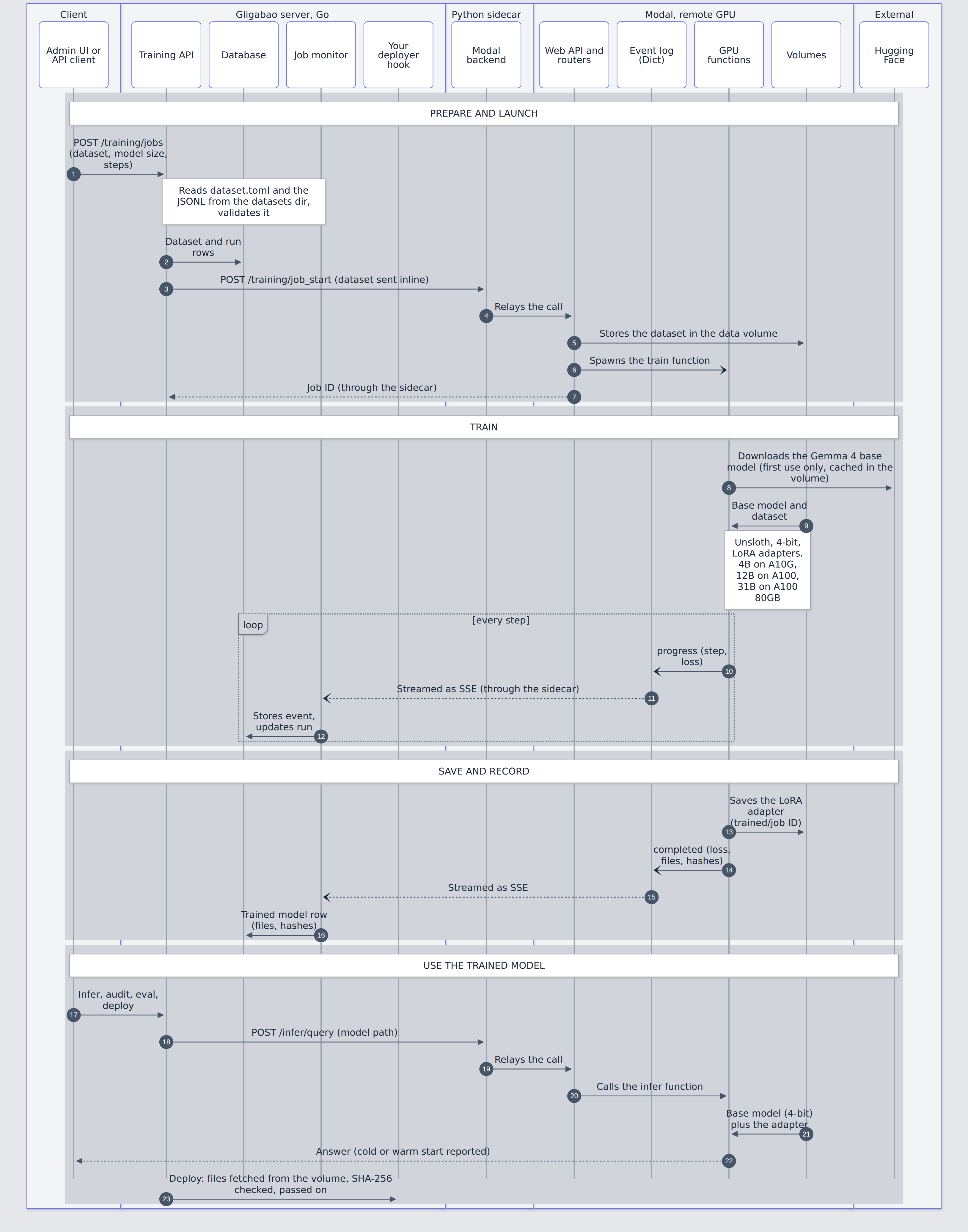
Sequence diagram of fine-tuning across the system components: the admin UI or API client, the Gligabao server (training API, database, job monitor, your deployer hook), the Python sidecar (Modal backend), Modal (web API and routers, event log, GPU functions, volumes) and Hugging Face. Prepare and launch: the client posts a training job, the server validates the dataset, saves rows in the database and calls the sidecar, which relays to Modal; Modal stores the dataset in the data volume and spawns the train function. Train: the GPU function downloads the Gemma 4 base model once and trains LoRA adapters in 4-bit with Unsloth (4B on A10G, 12B on A100, 31B on A100 80GB), writing progress events to the event log, which the job monitor follows as SSE and stores in the database. Save and record: the adapter is saved in the models volume, a completed event carries its files and hashes, and the monitor records the trained model row. Use the trained model: inference goes through the sidecar and Modal to an infer function that loads the base model in 4-bit plus the adapter, and deploying passes the verified files to your own deployer hook.

Train on remote GPUs

From dataset to a fine-tuned model, on Modal.

terminal
$ cd sidecar/ai_train
$ modal run app.py                          # checks image, volumes and GPU
$ modal run app.py --action train --model-size 4b --train-steps 100
$ modal run app.py --action generate --model-size 4b --prompt "..."

# or start a job from the server's API; it is recorded in gb_training_job_runs
$ curl -X POST localhost:7878/v1/gb/training/jobs -d '{"dataset":"my.jsonl","model_size":"12b","num_train_steps":500}'
{"id":1,"job_id":"fc-...","status":"started","model_size":"12b","num_train_steps":500,...}

The Python sidecar

The Go server stays pure Go; Python work lives in a small service beside it.

terminal
$ ./run_build_sidecar.sh           # builds gligabao-sidecar:latest
$ docker run --rm -p 127.0.0.1:8787:8787 gligabao-sidecar:latest

# or the server and the sidecar together, on one network
$ docker compose up --build

$ curl localhost:8787/health
{"status":"ok"}

Deploy a fine-tuned model

Once a model is trained, one request (POST /v1/gb/training/models/{id}/deployments) hands its weights to your own code. gligabao streams the files from the training storage to the server's disk, verifies each one against the size and SHA-256 recorded when the job completed, and passes the directory to a deployer: a Go hook (ServeOptions.TrainedModelDeployers) registered by the program that embeds gligabao, which can upload, copy or convert the files. gligabao has no built-in destination. Every deployment, failed ones too, is recorded in gb_trained_model_deployments, and a deployer that errors or panics marks the deployment failed instead of crashing the server.