Everything an AI application needs to remember, and nothing it doesn't.
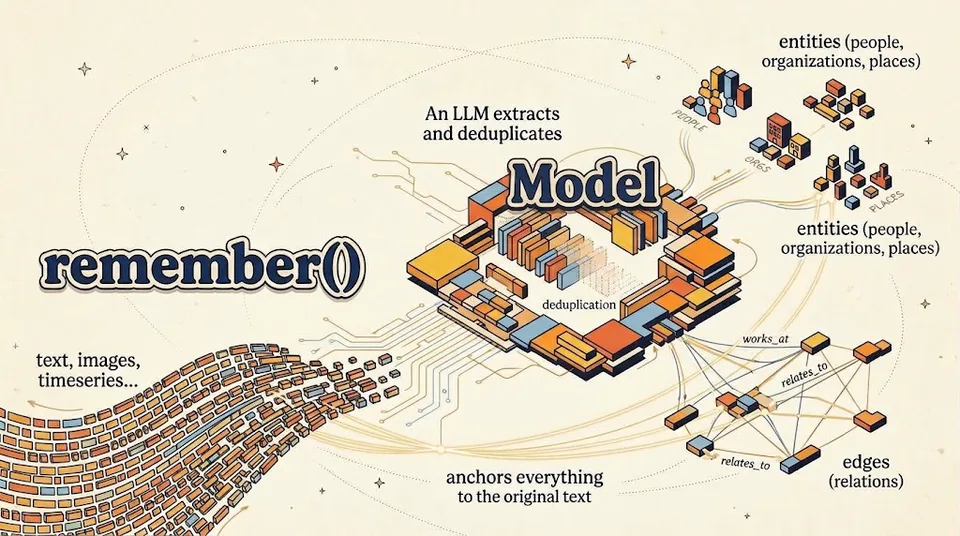
Entities and relations are extracted automatically from free-form text and deduplicated across everything you store.
- Entities and edges: people, organizations and places are nodes with a type; relations such as
works_at are edges, each with a one-sentence description.
- Deduplicated: entities are unique per dataset by normalized name and type, and a repeated fact is merged, not inserted again.
- Aliases: with embeddings on, "Alicia" finds the stored "Alice Smith" and her facts.
- Grounded in text: every entity and edge links back to the artifacts it came from.
- Exportable: the whole graph of a dataset comes out as JSON, with no LLM call.
Each fact records when it was true and when it was learned. Contradicted facts are closed, not deleted, so history is preserved.
- Two timelines:
valid_at / invalid_at for the world, created_at / expired_at for what Gligabao knew and when.
- Dates from text: relative dates ("last June") resolve against the
reference_time of the input.
- Contradictions: "Alice started working at Globex" closes "Alice works at Acme" at that date, whichever was learned first.
- Time-aware query: "Where does Alice work now?" uses the live fact. A superseded fact is not retrieved; one that ended without being replaced is, with its end date.
- Edge events: an append-only log records what each
remember did to each fact (created, confirmed, ended, invalidated, superseded), with its end date before and after; the admin UI plots it.
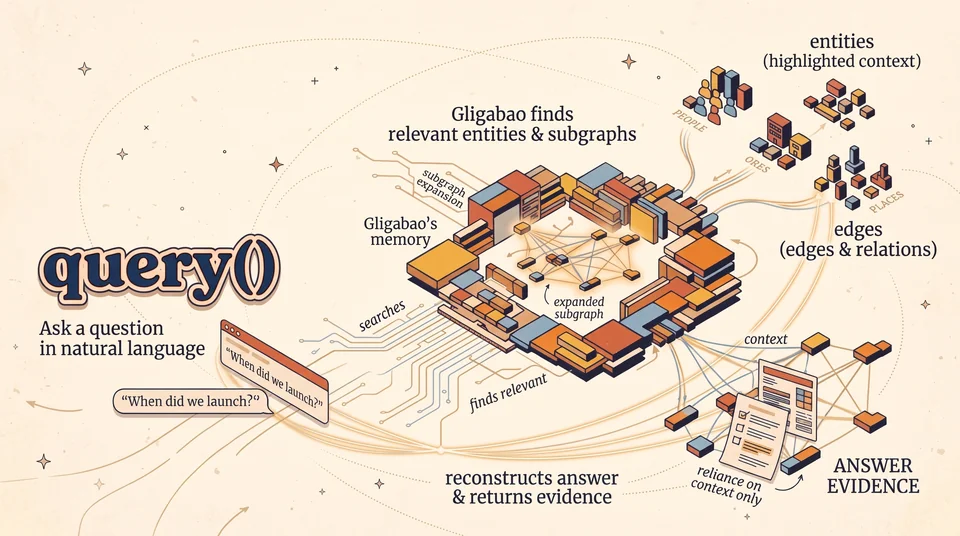
Query answers in natural language and returns the entities, edges and passages behind the answer, so you can verify it.
- Memory only: the answer is written from the retrieved subgraph and passages; if memory lacks the information, it says so.
- Keywords and similarity: the question is matched to entities by words and, through embeddings, by meaning (a question about someone's "employer" finds "Alice works at Acme"), then expanded one hop to the facts around them.
- Passages: the chunks of long texts that are close to the question are given to the model, the best ones with their text, and cited like entities and edges.
- Live facts only: a fact that newer knowledge superseded is never retrieved.
- Checked citations: cited IDs are validated against what the model was shown, so evidence never contains invented rows.
- Traceable: each cited edge points to its source artifact and carries its temporal fields.
- Tunable: pick the dataset, the session and the model's reasoning level per call.
- Retrieval only: with
evidence_only no LLM writes the answer, and you get everything that was retrieved, to answer with your own model.
Self-hosted
Runs on your own infrastructure, so your data stays with you. One static Go binary or one container, with no CGO and no C compiler.
- Relational DB: SQLite (a single file, the default) or PostgreSQL, chosen with
db_backend. The schema is created on startup.
- Graph store: entities, edges and artifacts are tables in the same database, so there is nothing extra to run. The graph layer is separate from the relational one, ready for dedicated graph databases.
- Vectors: chromem-go, an embedded pure-Go store kept in a directory next to the database (the default), Pinecone, hosted, or an Amazon S3 Vectors bucket. Isolated per dataset, with one index each for entities, edges, chunks and chunk summaries, all searched by
query.
- Docker: the image runs the server as a non-root user (how the images are built). Mount a volume on
/data for the database, vectors and images, and pass API keys as environment variables.
- Docker Compose: one command starts the server, whose image contains the Python ML sidecar, with a named volume for the data.
- Static binary: a pure-Go binary using the
modernc.org/sqlite driver. Copy it anywhere and run gligabao serve. See Build for how to build it on Linux, macOS and Windows.
Memory is organized per user and dataset. Datasets are fully isolated, and a query only sees its own graph.
Long documents
Long texts are split into overlapping chunks, each extracted, stored and embedded individually.
Send an image to remember() and a vision model reads it: its title and text blocks in reading order (OCR), plus a theme for the whole image.
- Themes: plot, chart, graph, diagram, table, document, screenshot, slide, map, photo and more.
- Formats: JPEG, PNG, GIF and WebP, up to 5 MiB.
- Deduplicated: an image already stored in the dataset is answered by its SHA-256, with no new model call.
- Files on disk: the database keeps metadata and what the model read, never the bytes.
- In the graph: the description the model writes is remembered by the text pipeline, so entities and edges come out of an image and
query sees them. A graph extractor hook can build that graph itself.
Store timeseries anchored to the entities and facts they describe.
Ontologies
Describe a domain in YAML or JSON (classes, relations, properties) and ground the graph remember extracts against it: tag what matches, flag or drop the rest, and add the ontology neighborhood of what matched (its classes, ancestors and relations) to the graph.
Optionally find the places among the entities and store their coordinates. See all features →
Export a dataset as a git repository, one commit per remember call: git log shows how the knowledge grew. See all details →
Web search
Optionally enrich memory with the latest web results about key entities.
A built-in web panel to inspect your memory and its graphs, follow every model call and its cost, run training and compare evals. See all features →
Two eval systems: programmatic checks of the memory pipeline against the real LLM, and an LLM judge for fine-tuned models. See all features →
Embed what remember() learned into a model's weights: Gemma 4 LoRA jobs on cloud GPUs, started from the server. See all features →
Use gligabao from the command line, with no HTTP calls: remember, query (with --evidence-only to only retrieve), dataset, research, api for any other endpoint, status and stop.
- Local daemon: the first command starts
gligabao serve in the background, on 127.0.0.1 and without authentication, and later commands reuse it. --server URL targets another server.
- Same as the API: flags or the exact REST body (
--json); the response is JSON on stdout, errors are JSON on stderr, and the exit code says what failed.
- Stable data: without a
gligabao.toml in the current directory, config, database and log are in ~/.gligabao.
Start a deep-research agent on a topic: it searches the web, reads pages and works with your knowledge base in the background, ends with a report, and you follow it state by state. Over REST (POST /v1/gb/research), MCP and gligabao research.
- A plain tool-calling loop: no agent framework. The model uses
web_search and fetch_url over several steps (and query and remember on your knowledge base), checks claims against more than one source, and the last step cannot call tools, so a run always ends with a report.
- Tracked in the database: every run (
gb_agent_research_runs) and every state the agent goes through (gb_agent_research_states: thinking, searching a query, reading a URL, ...) is stored, with steps, tokens and cost updated as it works.
- Sub-agents: the investigative loop runs independent questions of its frontier in workers (
max_parallel); the code of the loop starts them and reduces their findings, the model has no tool for it. Each worker is a run with a parent_id.
- Investigative loop: with
loop = "investigative" an agent works on a frontier of questions with notes, challenges its own claims and writes the report in a separate synthesis phase, with circuit-breakers on turns, tokens and cost.
- Agent definitions: an agent is a TOML or JSON file (prompt, model, skills, search and knowledge settings, cost caps, and an optional CRON schedule), chosen with
agent; a research can have a cost cap.
- Isolated: each agent has a goroutine, a struct and an HTTP client of its own; a user can have 3 working at once. It needs an Anthropic API key and each run costs money.
- In the server or in Modal: a run has a
runner, local (the default) or modal, which runs the standalone gligabao_agent binary in a Modal container, and loads what the agent learned back into your knowledge base when it ends.
Embeddable in Go
Run it as a standalone server or import it as a Go library, and either start its server on its own port or mount its handlers on your program's own HTTP mux. Choose the model for each pipeline stage.